


How many students were in your graduating class? Do you recall all of your favorite friends from your elementary, middle, or high school classes? And as time goes by, aren’t there special people from your school and classes that you have classic memories with that you probably haven’t thought of in years?
A class list breaking down all of your old schoolmates is sure to give you a trip down memory lane. But where can you find a list of the alumni from your school?
On Classmates®, you register through your high school, and can then join as an alumni for your elementary, middle school, high school and/or college too. So once you’re registered, you’ll automatically see a list of all of the other registered alumni to your school and grad year. And if your yearbook is in the Classmates digital yearbook collection with half a million U.S. yearbooks from over the decades, you can see the entire list of students from your class directly inside the pages of your old yearbook.
Here’s more details about a class list, how to find yours online with Classmates, and when having a list of alumni might be of value.
Key Takeaways
| – Classmates lets you access a full alumni class list the moment you register, showing every other member from your school and graduation year with free direct messaging to anyone on the list. – Upgrading to CM+ unlocks full yearbook access, giving you the most comprehensive class list available, with every graduate listed alphabetically alongside their school photos. – Class lists are valuable for nostalgia, reconnecting with old friends, planning reunions, and preserving your school and community’s history. |
What is a Class List?
A class list is just what it sounds like: it is a list of students within a certain school, class schedule, or teacher’s classroom. In elementary school, it likely refers to students within a single classroom that work with the same teacher year round. In middle, high school, and college, once students have differing schedules and teachers, it likely refers to the entire graduating class at a school.
So, for example, if you and your friend Lucy both had Mrs. Smith in fifth grade, she was on your class list. But if you and Lucy both attended the same high school but never had a class together, if you graduated at the same time she’d still be in your high school class alumni list.
How to Find Your Class Alumni List
There’s a few ways you can access your “Class List” on Classmates. When you register for free, you select your school name and graduation year. As soon as you’re logged in, you can see a full list of everyone else registered as an alumni from the same school and grad class.
If your yearbook is available in Classmates’ yearbook collection, you can also upgrade to CM+ to see all of the core pages of your book, including the sections featuring the class photos and full names of your fellow graduates.
Here’s details instructions for both ways of finding your class list
See Your Class List of Registered High School Alumni on Classmates
Over 90 million school alumni from across the United States have joined Classmates; many of which are looking to rekindle relationships with old connections from their youth.
Once you sign up for Classmates for free and provide your school name and grad year, you can access your Class List right from the homepage on your computer or mobile app.
Accessing Your Alumni List from the Classmates.com Website
On your computer, select your school name as follows on the Classmates homepage (see hyperlinked school name “Middletown South High School” in following example:

Example shown for demonstration purposes; actual results may vary. People’s last name hidden for privacy purposes
Once you click that link, you’ll instantly see a Class List of all “Alumni” from your grad class:

Example shown for demonstration purposes; actual results may vary. People’s last name hidden for privacy purposes
This list of names from your class is sure to drum up some classic memories. You can also click the dropdown button that currently says “1988” in the above screenshot to see alumni from your school registered to other grad years.
From the Mobile App
Similarly, you can select “View my school” on the Classmates mobile app homepage to see a similar list of all the registered alumni from your graduating high school class:

Example shown for demonstration purposes; actual results may vary. People’s last name hidden for privacy purposes
From either the mobile app or Classmates.com, it’s free to message other registered alumni from your school (or ANY registered user from around the U.S.) And if you upgrade to a Classmates+ membership, they’ll be able to read and reply to your message for free too.
How to See the Class List of Registered Alumni from Your Other Schools?
While registering gives you instant access to your high school Class List, maybe you’re trying to track down alumni from your elementary school, middle school, or college. It’s simple on the Classmates website.
From the computer version of the Classmates homepage, you can type in the other school you’re looking for into the search bar. Do you have a common school name? Add your town and/or state too:

Example shown for demonstration purposes; actual results may vary.
Once you select your school and open its dedicated page, you can see all of the registered alumni from any year (and hit the plus sign next to the school name to add yourself as an alumni of that school yourself)
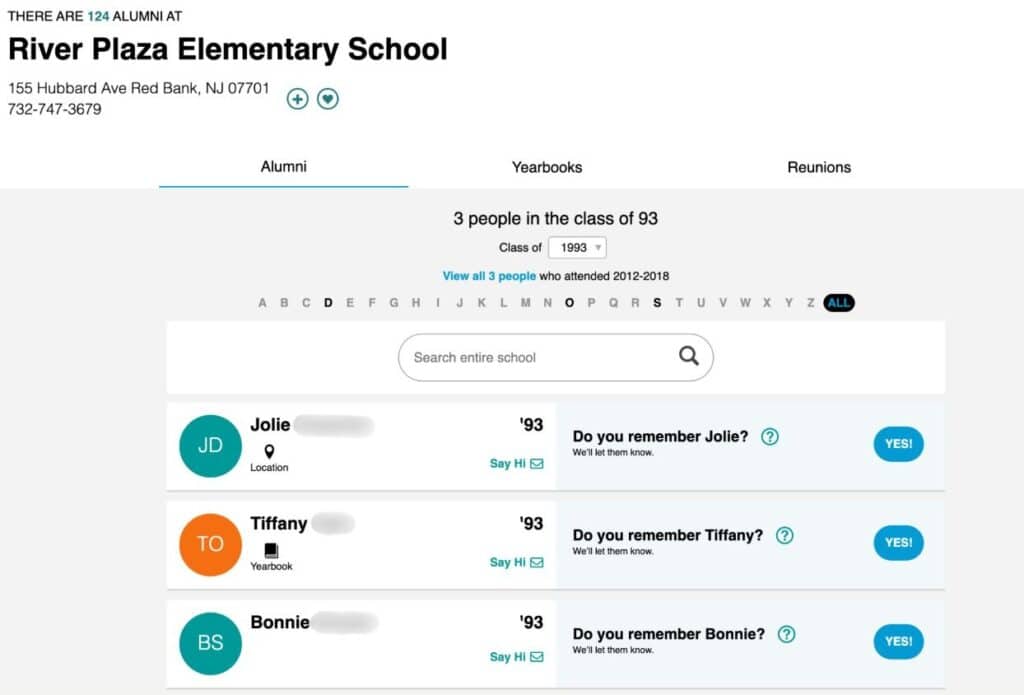
Example shown for demonstration purposes; actual results may vary. People’s last name hidden for privacy purposes
How to See Your Full Class List From Your Digital Yearbook
If your old high school yearbook is available in Classmates digital collection of over half a million yearbooks, you’ll be able to access it right from the Classmates homepage.
While you can view the first few pages for free, upgrading to CM+ will give you full access to view the entire yearbook. And of course, along with some hilarious old school photos, the yearbook section dedicated to your class year will provide the most comprehensive alumni class list you can find, all in alphabetical order!
Looking for elementary, middle school, or college yearbooks? Search your school name, town, and state and click on the school page (like the River Plaza Elementary example screenshot in the previous section) and select “Yearbooks” at the top of the page to see what yearbooks are available.
Old or former school names work too
Why Search for Your Old Alumni Class List
Here are popular reasons to track down a list of alumni:
- Nostalgia: A class list can unlock old memories buried deep in your mind. Seeing a name of an old friend written in text can bring you right back to a different time (especially if it’s alongside their old school picture in a yearbook)
- Reconnection: having your Class List of registered alumni from your school and grad year on Classmates makes it simple to send direct messages. Rekindle old relationships and catch up on life, whether for pleasure or networking.
- Event Planning: when planning a class reunion or other events with people you grew up with, having your class list handy makes it easy to send invites. Reunion planners should use the list of grads in their yearbook, so that they’re 100% sure no one gets left out!
- Historical Preservation: high school history is a fascinating part of genealogy. Preserving a class list helps to shape the broader historical record of your school and community.
More Ways to Find Your Class Alumni List
Beyond Classmates, you can turn to your school itself. Contact the administrative records department and see if they have access to the full class list, or an old yearbook featuring all of the names of students.
You can also try historical newspaper archives (local newspapers often release a full list of grads each year) or the local library.
Reconnect With Alumni From Your Class List for Free on Classmates
Whether you’re taking a trip down memory lane, planning a reunion, or want to send an old schoolmate a message, Classmates makes it easy to find your class list. Take a look at registered alumni from your high school right from the Classmates homepage, and send old schoolmates a message for free.
Or, look for your old yearbook and upgrade to CM+ to explore your full class list alongside classic photos within those pages.
Register for free to get started!
Related Blogs
- Digitizing Your Yearbook
- Classmates People Search
- Find People & Photos By Maiden Name
- Where to Find Old Family Photos
- Interesting Uses For Old Yearbooks
- Best Teen Coming Of Age Movies
- Most Populated Texas High Schools
- Most Fun Reunion Activities
- Where Does Classmates Source Its Digital Yearbooks From?
- Message & Lookup Family Members
- A Yearbook Reprint Purchasing Guide
All product names, logos, brands, trademarks and registered trademarks are property of their respective owners.


