

Even with all of the stressful moments that come with being a teacher, the relationships you forge with your students make it all worthwhile. Every late night grading papers, every faculty meeting, every early morning commute; all worth it knowing that you’re helping to shape the lives of your students (and having them help shape yours!)
Whether you’re an active or retired elementary, middle, or high school teacher (or college professor), there will always be those special students that especially stand out in your memory. What did they end up doing after graduation? Where are they today? Time to find out!
With Classmates search, it’s easy to look up old students. If they’re registered users, you can even shoot them a message! And of course, you can explore old yearbook photos of your students (and yourself) if your school’s yearbooks are included in Classmates’ digital archive of 480,000+ yearbooks.
Here’s how to start your student search on Classmates.
Key Takeaways
| – Classmates lets teachers search for former students by name and school, view their profiles, and send direct messages for free. – Upgrading to CM+ unlocks full access to Classmates’ archive of 480,000+ yearbooks, making it easy to find old class photos, candid shots, and faculty pictures from your teaching years. – Teachers can also find and message former colleagues, look up their own old teachers, and order yearbook reprints on Classmates to relive or share memorable classroom moments. |
Student Finder: Starting Your Search
You can search for students by name and school directly on Classmates. Here’s how:
- Register for Classmates
First things first, you need to register for Classmates for free by joining your own high school class, NOT the school you taught at. (Who knows, maybe you’ll rediscover long lost friends from your own high school too!)
Don’t worry, once you register you can search for people and yearbooks by name and school from across the U.S. (not just your own high school) including old students.
Start that yearbook registration process here and fill out the following details:
- First name
- Last name (for women, use your maiden name from high school)
- Current last name (if different)
- Email address
- School (select your state and city to find your school)
- Grad year
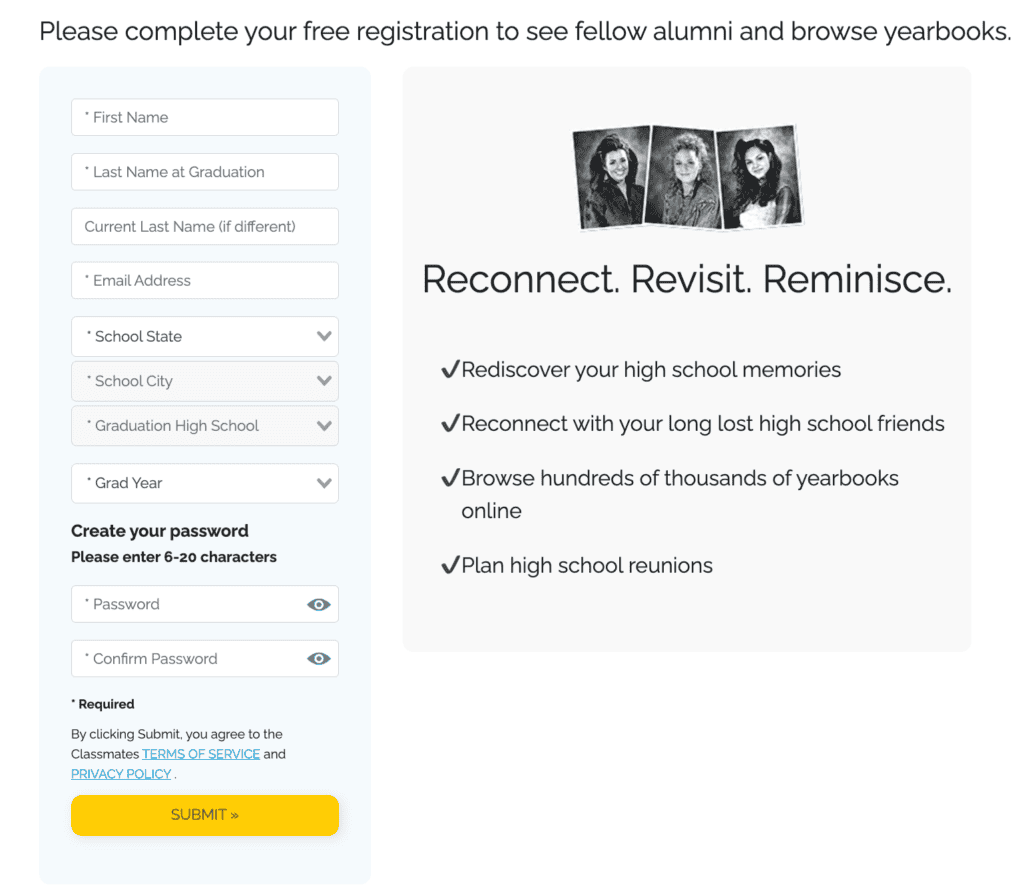
And there you have it! Hit submit, confirm your email, and you’ll officially be a Classmates member and can kick off your student search.
- Start Your Student Search
Your favorite students may be on Classmates to keep in touch with their schoolmates and access digital versions of their old yearbooks.
Start searching for your student in the upper right hand corner of the homepage once you’re logged in. There is a search bar for looking people up by name where you can select “All People & Schools” and type in their name. To refine the search, also include the name of the school they attended and/or the town name.

Example searches:
- [Name] – John Smith
- [Name + Town Name + State] – John Smith Middletown New Jersey
- [Name + School Name] – John Smith Middletown High School South
- [Name + School Name + Town Name + State] – John Smith Middletown High School South Middletown New Jersey
If you were their teacher in elementary or middle school, you should still look up their name + HIGH SCHOOL specifically, since they likely registered for Classmates with their high school (rather than elementary or middle school).
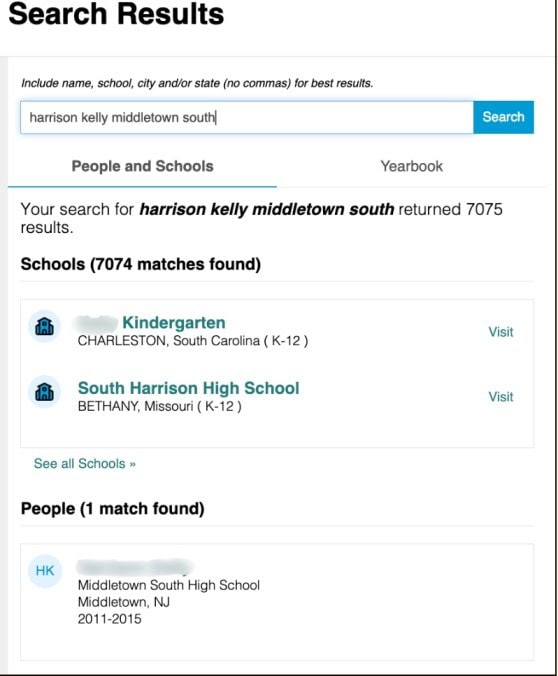
Example shown for demonstration purposes; actual results may vary.
Hit enter, and the results on Classmates will be all of the listed alumni with the provided name.
You can verify its your student if you know the timeframe that they attended the school, since their years of attendance are featured directly below their name in the search results:
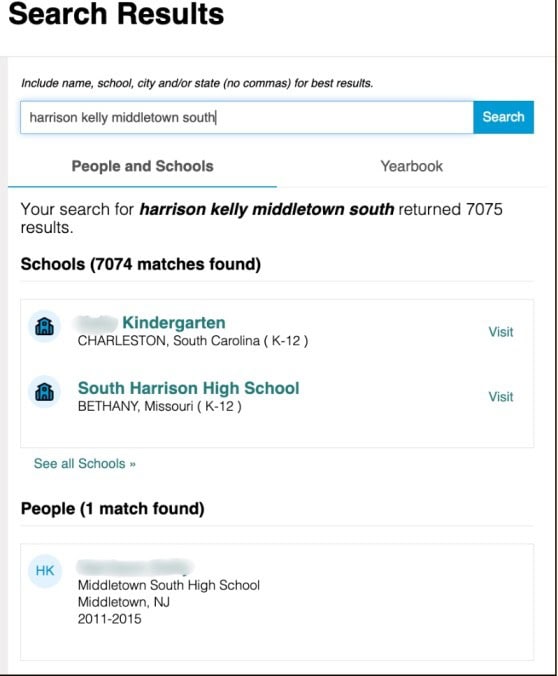
Example shown for demonstration purposes; actual results may vary.
- View Their Profile and/Or Send Them a Message
If you find your student, you can click on their name to view their profile, or can click on the message icon if you’d like to reach out via Classmates DMs.

Example shown for demonstration purposes; actual results may vary.
Type up your message and hit send! It’s free to send messages. For them to be able to view and respond to your message for free, you can upgrade to Classmates+!
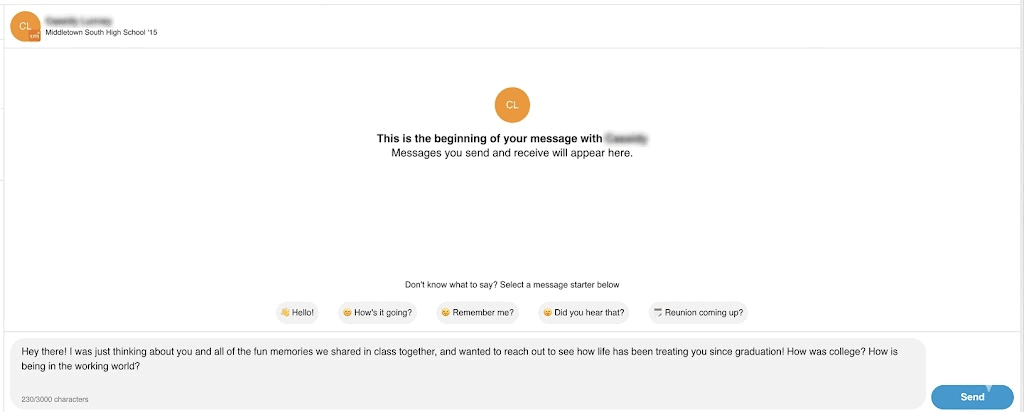
Example shown for demonstration purposes; actual results may vary.
Look at Old Student / Teacher Photos in Your School Yearbooks!
Taking a trip down memory lane and wondering what your old class list looked like? Do you remember a classic candid shot of you teaching some of your favorite students in class in a vintage yearbook? Look for old class pictures of your students and yourself back in the day in the Classmates yearbook collection that features 480,000+ elementary, middle, high school, and college yearbooks.
- Start with a Yearbook Search
You can start your yearbook search here.
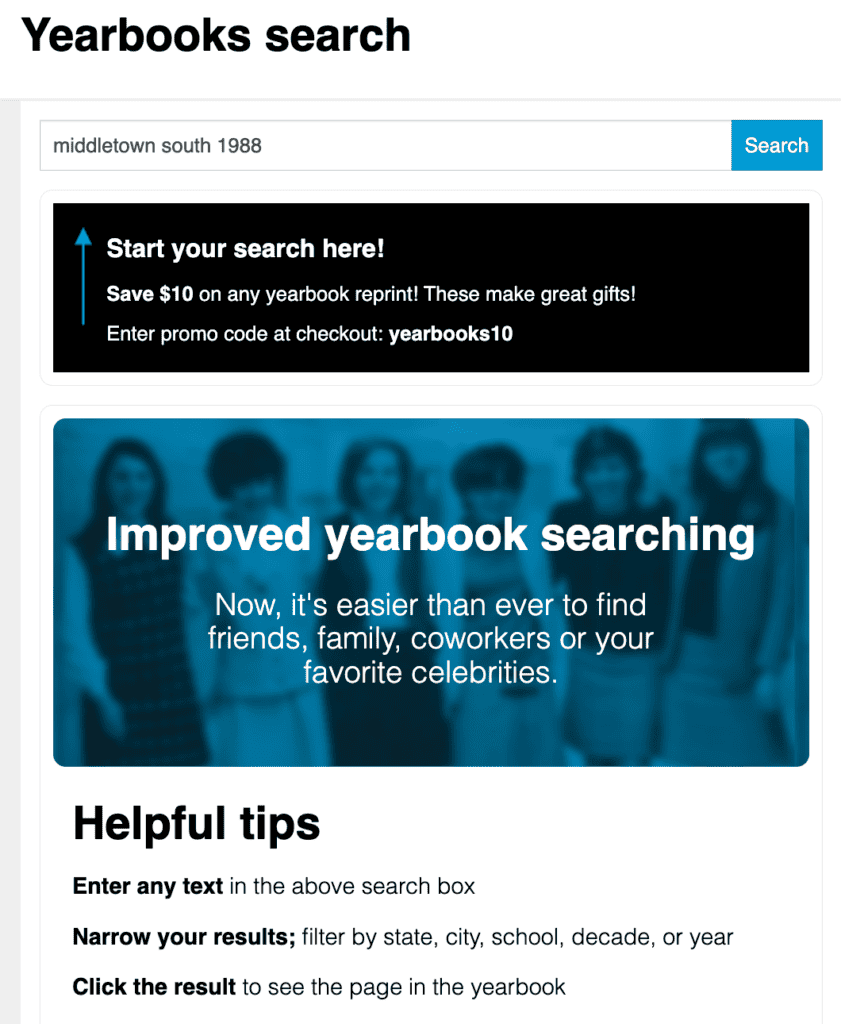
Example shown for demonstration purposes; actual results may vary.
If you know the specific year your student was in your class, search for your school name + the year to see if Classmates has that specific yearbook. Do you have a common school name? You can add your state name to refine your search.
- If It’s Available, Click on the Yearbook
If Classmates has that book available, it should show up in the yearbook search results as follows:

Example shown for demonstration purposes; actual results may vary.
If that’s the school and year you’re looking for, click on it! If not, refine your search to see if other yearbooks featuring the student you’re searching for are in the collection. You can do so by changing up what you have written in the search bar, or by narrowing the results by filtering by state and decade.
- View the Yearbook in Grid Format for Free (& Upgrade to CM+ to View It in Full)
Once you arrive at the yearbook, you can see some of the pages for free. To view it in full, you can upgrade to a Classmates+ membership.
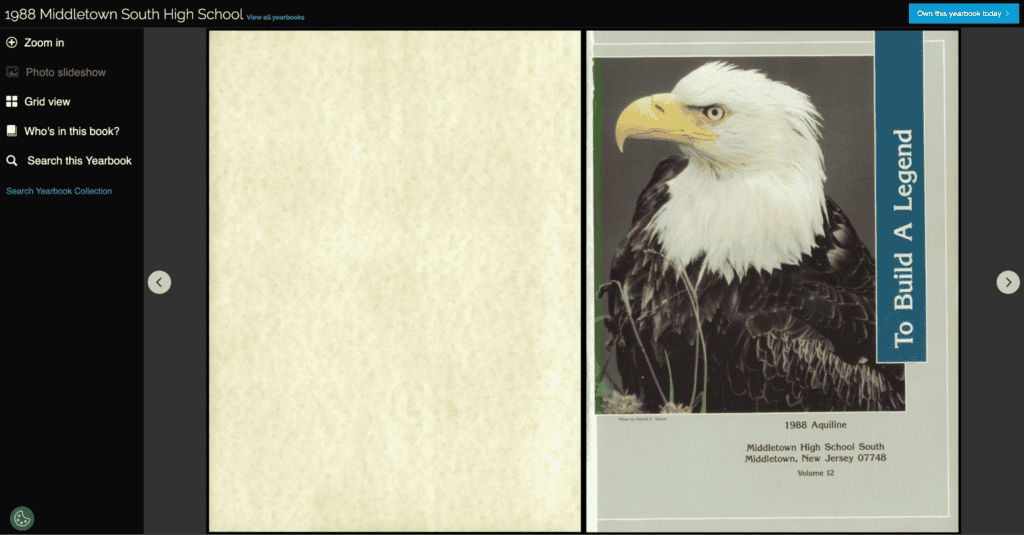
See this yearbook page here: https://www.classmates.com/siteui/yearbooks/147576?page=5
From there, you’ll be able to explore senior portraits, candid classroom shots, and even your own faculty photos for a serious trip down memory lane. In the left hand corner, you can select “Who’s in this book?” to look up other registered members by name alphabetically. Or search for specific phrases/words by selecting “Search this Yearbook.”
Thinking you’d like a copy for yourself or to give as a gift to an old student? You can order a yearbook reprint* by selecting “Own this yearbook today” in the upper left hand corner.
Old or former school names work too
Bonus: Message Other Teachers Too
The other teachers played just as much of a role in your life experience as the students! Whether you want to search for and message old coworkers or your old teachers from when you were a student yourself, if they are registered on the site and have a profile or featured yearbooks in the historical archive, you can search for them directly to send messages or find their old school photos too.
If you know where they went to high school, search their name + high school in the search bar on the upper right hand side of the Classmates homepage. Here’s a helpful resource for Searching for Teachers.
You can shoot a message to anyone that’s a registered user across the entire U.S.
More Ways to Find Old Students
Beyond Classmates’ person and yearbook search, there are other ways to search for old students.
Here are more tips for finding them:
- Reach out to mutual connections: Other teachers might have run into or heard from old students. Or maybe you know their relatives in town. Inquiring directly with people you know can get you an update on old students’ lives and maybe even some contact information!
- Attend their high school reunion: class reunions happen every 5 to 10 years. Since you were such a beloved teacher, your old students would likely love to have you make a guest appearance. The reunion planner may have used Classmates as the official class reunion website. You can reach out to old alumni about the event using Classmates.
- Search on Google: try various searches to find information and contact info for an old student. Try searching by their name or name + town + state (e.g. “john smith middletown nj”) to get details about their life.
Classmates: The Ultimate Student Finder Website
Classmates prides itself on being the largest alumni social media network for keeping school connections alive, with 90 million registered users and more than 480,000 yearbooks. By joining as a teacher, you can play a key role in the preservation of school history that Classmates is committed to.
Register for free to search for old students and see if classic yearbooks from your time in education are available.
Student Search FAQs
- How to Look Up Old Students?
Classmates is the perfect place to start a student search with over 90 million members that graduated from U.S. schools. Since people select their high school and graduation year when registering (and women that have since gotten married join with their maiden name), you can search for your students based on their name and high school they attended to see if they’re an active member. If they are, you can shoot them a message for free.
Other options include searching their name on Google, searching on Facebook, or contacting mutual connections.
- How to Search if an Old Student is Still Alive?
Searching on Google for your student’s name and the town they grew up in is the easiest way to see if they’re still alive. If they’ve passed, oftentimes obituaries will be at the top of the search results.
You could also reach out to alumni or mutual connections via Classmates, email, or other messaging platforms to inquire about their whereabouts and if they’re still living.
- Can Teachers Attend High School Reunions?
Yes, class reunions are an excellent way for teachers to reconnect with their students face to face. Since they happen every 5 to 10 years, you can get in touch with the reunion planner (often the class president) in the lead up to the event and express interest in making an appearance.
If they’re planning the event through Classmates free reunion planning feature, you can have them send the event invite to your profile.
- Why Should Teachers Stay in Touch With Old Students?
If a particular student sticks out in your mind years down the line, chances are you made a lasting impression on them and stayed in their thoughts for all of these years.
Sending a message to an old student to see what they’re up to (and filling them in on your own life) is sure to be a rewarding experience for you both.
*Yearbook reprints are created from previously owned copies and may include handwriting or effects of aging may be present, and pages, images, or other content may be missing or obscured.
Related Blogs
- Finding High School Photos of Your Family
- How to Digitize Your Yearbook
- Finding By Name for Free
- Where Does Classmates Source Yearbooks From?
All product names, logos, brands, trademarks and copyrights are property of their respective owners.


